Certificate authorities, HTTPS, and TLS — how secure websites actually work
An end-to-end blueprint of website identity, certificate issuance, browser verification, and encrypted connections. With real-world use cases.
Every secure connection on the internet depends on a trust system most people never see. Certificates, certificate authorities, TLS handshakes, chain-of-trust validation — these are the mechanisms that make the lock icon appear in your browser. This blueprint walks through the entire system end to end, with real-world use cases that show why it matters beyond the textbook.
The big picture — how a website works
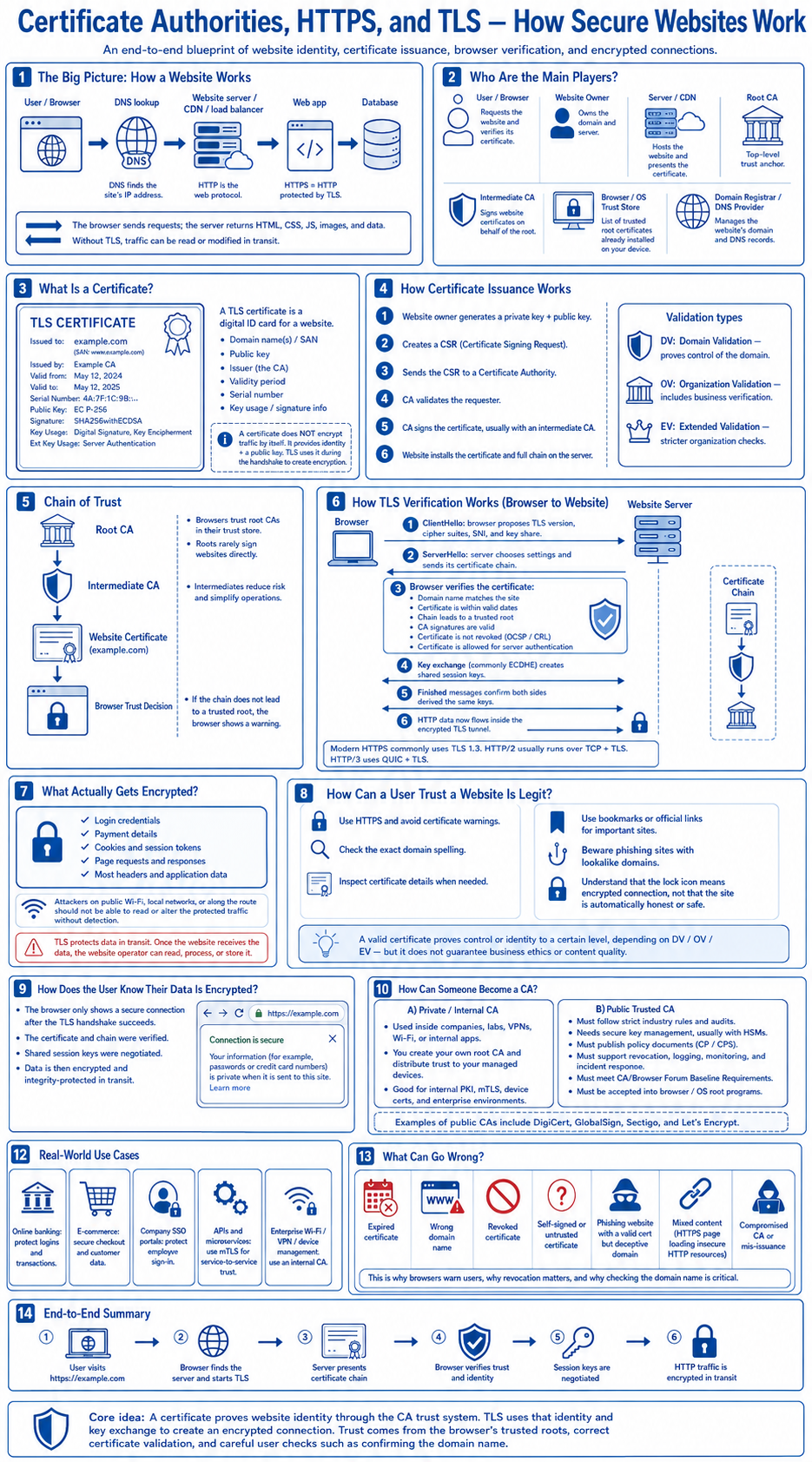
A user's browser performs a DNS lookup to find the site's IP address. HTTP is the web protocol. HTTPS is HTTP protected by TLS. The browser sends requests; the server returns HTML, CSS, JS, images, and data. Without TLS, traffic can be read or modified in transit by anyone on the network path — your ISP, a coffee shop's Wi-Fi, a compromised router.
The main players: the user's browser (requests the website and verifies its certificate), the website owner (owns the domain and server), the server/CDN (hosts the website and presents the certificate chain), the Root CA (top-level trust anchor), intermediate CAs (sign website certificates on behalf of the root), the browser/OS trust store (list of trusted root certificates already installed on your device), and the domain registrar/DNS provider (manages the website's domain and DNS records).
What is a certificate — and how issuance works
A TLS certificate is a digital ID card for a website. It contains the domain name(s) and SAN, public key, issuer (the CA), validity period, serial number, and key usage/signature info. A certificate does not encrypt traffic by itself — it provides identity and a public key. TLS uses it during the handshake to create encryption.
Issuance follows six steps: the website owner generates a private key and public key, creates a CSR (Certificate Signing Request), sends the CSR to a Certificate Authority, the CA validates the requester, the CA signs the certificate (usually with an intermediate CA), and the website installs the certificate and full chain on the server.
Three validation types exist. DV (Domain Validation) proves control of the domain — cheapest, fastest, sufficient for most sites. OV (Organization Validation) includes business verification. EV (Extended Validation) requires stricter organization checks and historically showed the green bar in browsers.
Real-world use case: when your bank's website shows a certificate issued to "JPMorgan Chase & Co." by DigiCert with OV validation, that means DigiCert verified the organization's legal identity before issuing the certificate. When a developer spins up a side project on Vercel with a Let's Encrypt DV cert, only domain ownership was verified — which is perfectly appropriate for that use case.
Chain of trust
The trust model is hierarchical. Browsers trust Root CAs in their trust store. Roots rarely sign websites directly — that would be catastrophic if compromised. Instead, intermediates reduce risk and simplify operations. The chain runs: Root CA (in your browser's trust store) signs an Intermediate CA, which signs the Website Certificate.
If the chain does not lead to a trusted root, the browser shows a warning. This is why self-signed certificates trigger errors in browsers — there is no chain to a root the browser trusts.
Real-world use case: when Cloudflare issues a certificate for a customer's domain, the chain typically runs from Baltimore CyberTrust Root (or DigiCert Global Root) through a Cloudflare intermediate to the leaf certificate. If Cloudflare's intermediate were revoked tomorrow, every site behind it would show certificate warnings until a new intermediate was issued and deployed. This is why major CDN providers maintain multiple intermediate chains.
How TLS verification works — browser to website
The TLS handshake follows six steps between browser and server:
1. ClientHello: browser proposes TLS version, cipher suites, SNI, and key share. 2. ServerHello: server chooses settings and sends its certificate chain. 3. Browser verifies the certificate: domain name matches the site, certificate is within valid dates, chain leads to a trusted root, CA signatures are valid, certificate is not revoked (OCSP/CRL), and certificate is allowed for server authentication. 4. Key exchange (commonly ECDHE) creates shared session keys. 5. Finished messages confirm both sides derived the same keys. 6. HTTP data now flows inside the encrypted TLS tunnel.
Modern HTTPS commonly uses TLS 1.3. HTTP/2 usually runs over TCP + TLS. HTTP/3 uses QUIC + TLS.
Real-world use case: when an e-commerce site handles checkout, the TLS 1.3 handshake completes in a single round trip (vs. two in TLS 1.2). The browser verifies the certificate chain, establishes forward-secret session keys via ECDHE, and all payment data flows encrypted. If the certificate's SAN does not include the exact domain the user typed, the handshake fails — which is why misconfigured CDN deployments are one of the most common causes of certificate errors in production.
What actually gets encrypted — and what does not
Inside the TLS tunnel: login credentials, payment details, cookies and session tokens, page requests and responses, most headers and application data.
Attackers on public Wi-Fi, local networks, or along the route should not be able to read or alter the protected traffic without detection. But TLS protects data in transit only. Once the website receives the data, the website operator can read, process, or store it. A valid HTTPS connection does not mean the site itself is trustworthy — it means the connection to it is private.
Real-world use case: a phishing site can have a perfectly valid TLS certificate from Let's Encrypt (DV validation only proves domain control, not intent). The lock icon means the connection is encrypted — not that the site is legitimate. This is why security awareness training needs to emphasize checking the actual domain name, not just the presence of HTTPS.
How a user can tell if a website is legit
Use HTTPS and avoid certificate warnings. Check the exact domain spelling — attackers register lookalike domains (paypa1.com, arnazon.com). Inspect certificate details when needed. Use bookmarks or official links for important sites. Beware phishing sites with lookalike domains. Understand that the lock icon means encrypted connection, not that the site is automatically honest or safe.
A valid certificate proves control or identity to a certain level, depending on DV / OV / EV — but it does not guarantee business ethics or content quality.
Real-world use case: during a spear-phishing campaign targeting a financial services firm, the attackers registered a domain one character off from the target's internal portal and obtained a legitimate DV certificate within minutes. Employees who checked for HTTPS saw the lock icon and trusted the page. The defense that caught it was not certificate inspection — it was DNS monitoring that flagged the newly registered lookalike domain. Defense in depth matters more than any single signal.
How the user knows their data is encrypted
The browser only shows a secure connection after the TLS handshake succeeds. The certificate and chain were verified. Shared session keys were negotiated. Data is then encrypted and integrity-protected in transit. The browser shows "Connection is secure" with a message like "Your information (for example, passwords or credit card numbers) is private when it is sent to this site."
Real-world use case: when a company deploys a TLS-terminating load balancer (AWS ALB, Cloudflare, nginx), the browser sees the connection as encrypted end to end. But the traffic is decrypted at the load balancer and may travel unencrypted between the load balancer and the origin server on a private network. For compliance-sensitive workloads (healthcare, financial, government), this internal hop often needs its own TLS connection — end-to-end encryption means all the way to the application, not just to the edge.
Private vs. public CAs — and how to become one
Private / Internal CAs are used inside companies, labs, VPNs, Wi-Fi, or internal apps. You create your own root CA and distribute trust to your managed devices. Good for internal PKI, mTLS, device certs, and enterprise environments.
Public Trusted CAs must follow strict industry rules and audits, need secure key management (usually with HSMs), must publish policy documents (CP/CPS), must support revocation, logging, monitoring, and incident response, must meet CA/Browser Forum Baseline Requirements, and must be accepted into browser/OS root programs. Examples: DigiCert, GlobalSign, Sectigo, and Let's Encrypt.
Real-world use case: a zero-trust deployment at a 5,000-person enterprise uses an internal CA (Microsoft AD CS or HashiCorp Vault PKI) to issue short-lived mTLS certificates to every workstation and service. When an employee's laptop connects to an internal API, both sides present certificates — the server proves its identity, and the client proves the device is managed and authorized. This mutual TLS (mTLS) is the foundation of service mesh security in Kubernetes (Istio, Linkerd) and is increasingly required for API-to-API communication in regulated environments.
Real-world use cases
Online banking: protect logins and transactions. The TLS certificate chain is the first line of defense against man-in-the-middle attacks on financial data.
Company SSO portals: protect employee sign-in. A compromised or expired certificate on the SSO portal locks out the entire workforce — certificate lifecycle management is operational, not just security.
APIs and microservices: use mTLS for service-to-service trust. In a microservices architecture with 200 services, mTLS certificates rotate automatically (typically every 24 hours in Istio) — no human manages them. The mesh handles issuance, rotation, and revocation.
Enterprise Wi-Fi / VPN / device management: use an internal CA. 802.1X enterprise Wi-Fi uses certificates to authenticate devices to the network. BYOD devices without the corporate root CA installed cannot join the trusted network segment.
CI/CD pipelines: code signing certificates prove that a build artifact was produced by the authorized pipeline. Without certificate-based signing, a compromised build server can inject malicious code that passes every other check.
What can go wrong
Seven failure modes that practitioners encounter:
1. Expired certificate: the most common outage cause. Automated renewal (Let's Encrypt + certbot, or ACME protocol) eliminates this for public certs. Internal CAs need their own automation. 2. Wrong domain name: the certificate's SAN does not match the requested hostname. Common during CDN or load balancer migrations. 3. Revoked certificate: the CA revoked the certificate (compromise, mis-issuance). Browsers check via OCSP or CRL. 4. Self-signed or untrusted certificate: the chain does not lead to a root the browser trusts. Common in dev environments that leak into production. 5. Phishing website with a valid cert: DV certificates are easy to obtain. The cert is legitimate; the site is not. 6. Mixed content: HTTPS page loading insecure HTTP resources. Browsers block or warn. Breaks the security guarantee. 7. Compromised CA or mis-issuance: a CA issues a certificate to someone who should not have it. This is why Certificate Transparency logs exist — public, append-only logs that let anyone audit every certificate issued for any domain.
This is why browsers warn users, why revocation matters, and why checking the domain name is critical.
The end-to-end summary
Six steps, from URL to encrypted traffic:
1. User visits https://example.com. 2. Browser finds the server and starts TLS. 3. Server presents certificate chain. 4. Browser verifies trust and identity. 5. Session keys are negotiated. 6. HTTP traffic is encrypted in transit.
Core idea: a certificate proves website identity through the CA trust system. TLS uses that identity and key exchange to create an encrypted connection. Trust comes from the browser's trusted roots, correct certificate validation, and careful user checks such as confirming the domain name.
The system is not perfect — it depends on CAs behaving correctly, browsers enforcing standards, and users paying attention to warnings. But it is the foundation that makes secure commerce, banking, healthcare, and enterprise communication possible on the open internet.